Embed the talent calculator
The quick way: the Embed button
Open the talent calculator, pick a class and race, spend the points, then press Embed next to "Copy build link". It writes all three codes for the build on screen, each with a Copy button.
1. A picture of the build that links back
The picture shows the three trees with the spent talents lit and their ranks on them. Clicking it opens the build in the calculator. It works anywhere that accepts plain HTML.
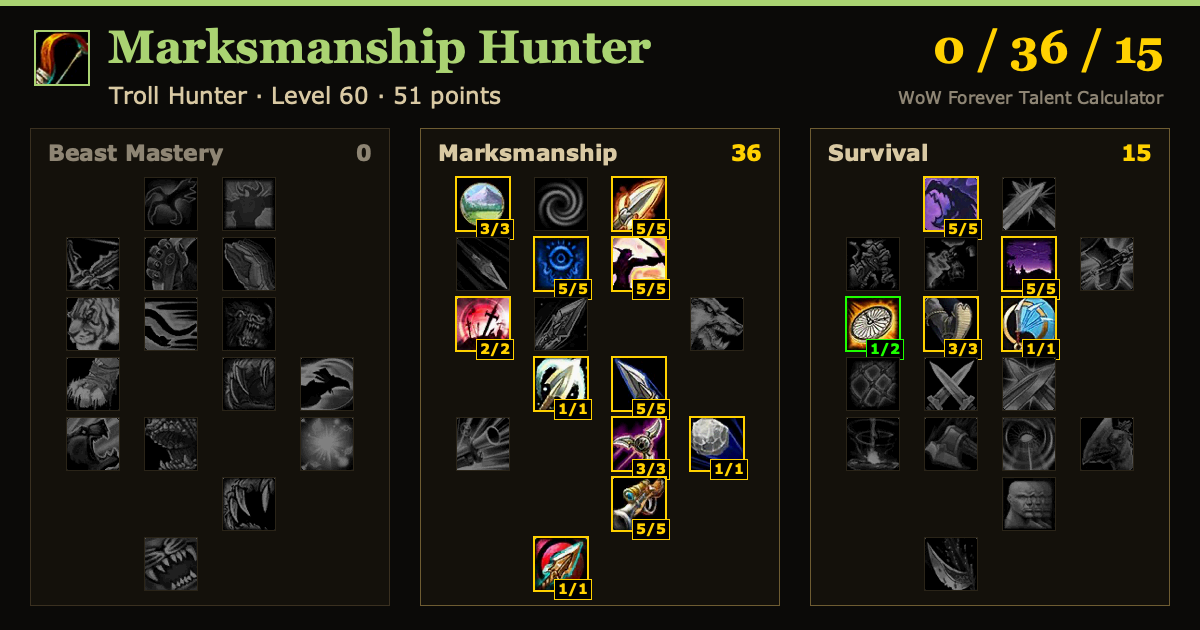
<a href="https://playautotechnologies.org/b/Hunter/Troll/0000000000000000-3050552001503151-500050131000000000/0"><img src="https://playautotechnologies.org/bi/Hunter/Troll/0000000000000000-3050552001503151-500050131000000000/L60.png" alt="WoW Forever Hunter talent build 0/36/15" width="600" style="max-width:100%;height:auto"></a>
2. Forum code
For forums that use square-bracket codes (BBCode). It gives the same picture and link.
[url=https://playautotechnologies.org/b/Hunter/Troll/0000000000000000-3050552001503151-500050131000000000/0][img]https://playautotechnologies.org/bi/Hunter/Troll/0000000000000000-3050552001503151-500050131000000000/L60.png[/img][/url]
In Discord and most chat apps you do not need any code: paste the build link from "Copy build link" and the picture appears on its own.
3. The live calculator in a frame
This puts the working calculator on your page: visitors can pick a class, spend points and copy their own build link. The code from the Embed button opens on the build you made; the one below opens empty.
<iframe src="https://playautotechnologies.org/wow-forever-talents?embed=1" title="WoW Forever talent calculator" width="100%" height="1080" style="border:0;max-width:1100px" loading="lazy" allow="clipboard-write"></iframe>
<p><a href="https://playautotechnologies.org/wow-forever-talents">WoW Forever talent calculator</a> by Playground</p>
The frame is 1080 pixels tall, which fits the three trees side by side on a page at least 800 pixels wide. On a narrower page the trees turn into tabs and the frame scrolls.
Can I use it on a commercial or ad-supported site?
Yes. The only ask is that you leave the link back to the calculator in the code.
Will an embedded build change when the game is patched?
The picture and the calculator are drawn from the current talent data each time, so they follow the game. If a patch removes or moves a talent, an old build link can come out with different points; make the build again and copy the new code.
Where does the talent data come from?
From the talentsforever.com data export (CC BY 4.0), read from the WoW Forever client, build 1.60.1.70755. The calculator shows that credit on its own page, so an embed carries it too.